Roku is best known for its affordable streaming players and easy-to-use interface, but the company also sells its own line of smart TVs with its software built in. The best Roku TVs combine an intuitive user experience with solid image quality and prices that won’t break the bank.
Read more Uber is laying off 10% of its staff as it seeks to cut management layers
I’ve spent more than 10 years reviewing home entertainment products, and I used that expertise to narrow down the two best Roku TVs available today. The Roku Pro Series earns my top recommendation thanks to its impressive brightness, strong contrast, and excellent remote control. For shoppers looking for a more affordable option, the Roku Plus Series is the better value pick. It can’t match the brightness levels of the Pro Series, but it still offers solid color performance for the money.
Roku’s platform is also used on budget TVs from brands like TCL, Hisense, and Onn, but Roku’s own sets have typically provided better picture quality. That’s why this guide focuses specifically on Roku-branded TVs. Both of my recommendations come in multiple screen sizes, so you have options for different spaces and budgets.
Our top picks for the best Roku TVs
Best overall: Roku Pro Series QLED 4K TV – See at Amazon
Best budget: Roku Plus Series QLED 4K TV – See at Amazon
The best Roku TVs, compared
| Roku Pro Series QLED 4K TV | Roku Plus Series QLED 4K TV | |
| Pick | Best overall | Best budget |
| Starting price | $899 | $499 |
| Panel type | QLED, 120Hz | QLED, 60Hz |
| Backlight | Mini LED with local dimming | Mini LED with local dimming |
| HDMI ports | Two HDMI 2.1, two HDMI 2.0 | Four HDMI 2.0 |
| Remote | Voice Remote Pro 2 with hands-free voice control, USB-C charging, and backlit keys | Enhanced Voice Remote with voice search |
Best overall

Roku’s flagship Pro Series is a strong all-around 4K TV. TCL and Hisense offer slightly better picture quality at similar prices, but the Pro Series stands out for its simple and reliable interface, rechargeable voice remote, and hassle-free setup.
What we like
What we don’t like
When it comes to balancing performance and price, the Roku Pro Series is the best Roku TV for most people. It strikes a nice balance between premium features and everyday value, all while showcasing Roku’s clean design and easy-to-use interface.
Our reviewer tested the first-generation Pro Series, but Roku has since rolled out a slightly updated second-generation model. The newer version offers a modest increase in brightness but otherwise delivers the same overall experience. Since the older edition is now tough to find, the second-generation Pro Series is the better buy.
The Pro Series uses a QLED panel paired with a Mini LED backlight and full-array local dimming. This combination produces a bright, contrast-rich picture that’s a noticeable upgrade over Roku’s entry-level sets. Black levels look solid, highlights have punch, and colors pop — especially when watching HDR10, Dolby Vision, or HDR10+ content (you can learn more about HDR in our HDR TV guide). Some minor light bleed cropped up in a few scenes during testing, but overall performance is in line with that of other Mini LED TVs in this price range.
Gamers will appreciate the 120Hz refresh rate and variable refresh rate (VRR) support, which help deliver smooth, responsive gameplay on consoles like the PS5 and Xbox Series X. That said, the Pro Series lacks a dedicated gaming bar for quick setting adjustments and can’t support higher-refresh-rate modes like 144Hz or 165Hz on PCs, both of which are common among competitors.
As with most QLED models, viewing angles are a bit limited. The picture looks great when you’re sitting front and center, but colors and contrast fade when viewed from the side. If wide viewing angles are a priority, I recommend switching gears to an OLED TV. Though those options will cost more.
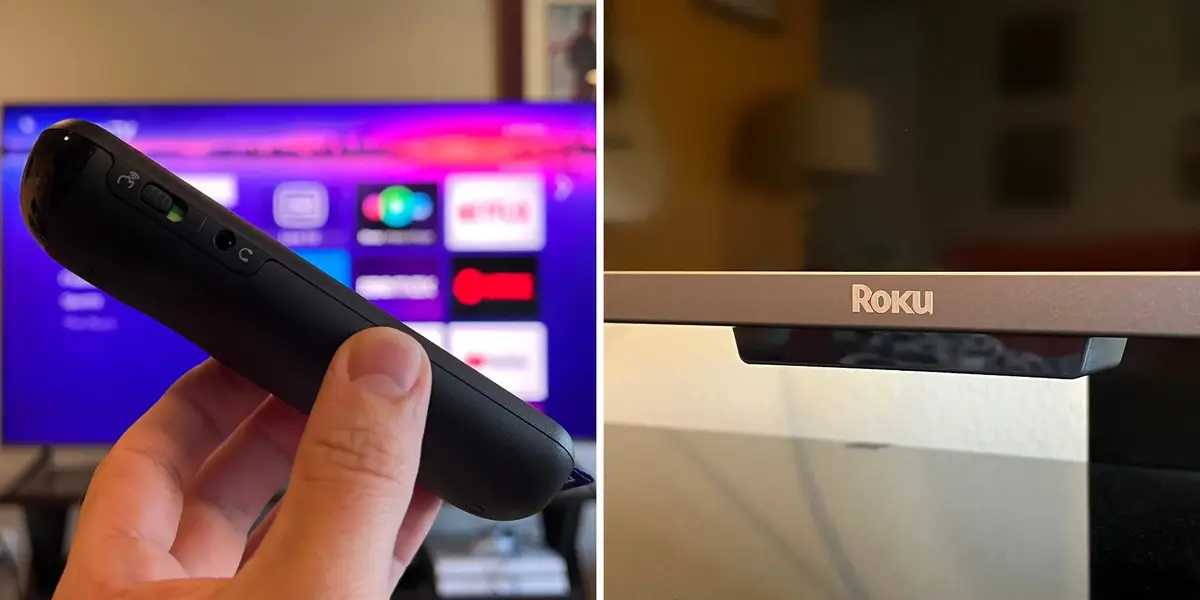
Roku rounds out the package with its Voice Remote Pro 2, one of the most intuitive remotes on the market. It offers hands-free voice control, a USB-C rechargeable battery, automatic backlighting when you pick it up, and a “lost remote finder” chime, which is a lifesaver when it disappears between couch cushions.
Setup is simple, too. The stand attaches tool-free using Roku’s quick-fit knob system, and you can choose between low and high stand positions depending on whether you want to accommodate a soundbar or prefer a cleaner, lower-profile look.
While the Pro Series costs more than Roku’s Plus and Select models, its combination of premium picture quality, sleek design, and thoughtful features firmly establishes it as Roku’s flagship. It’s available in 55-, 65-, and 75-inch sizes.
Read our Roku Pro Series 4K TV review (2024 model).
Check out our guides to all the best TVs and best smart TVs.
Best on a budget

The Roku Plus Series is the brand’s most affordable QLED TV model. This second-generation edition uses a Mini LED backlight for improved local dimming, but it still can’t match the HDR brightness capabilities of the step-up Pro Series.
What we like
What we don’t like
The Plus Series is the best Roku TV for budget-conscious buyers. This QLED display sits one step below the brand’s flagship Pro Series, and though it lacks some of that model’s advanced features, it still offers good value.
The Plus Series we tested was the original model released in 2023. Roku has since discontinued that edition and replaced it with an upgraded second-generation model. The new Plus Series offers similar capabilities but has a couple of improvements.
Notably, the latest Plus Series now features a Mini LED backlight, offering improved contrast control compared to the older model. This should improve black-level performance. That said, the Plus Series is still noticeably dimmer than Roku’s brighter Pro Series TV, so its HDR highlight performance isn’t quite as impactful.
Aside from brightness, the latest Plus Series also falls behind the Pro Series in gaming performance. The Plus Series features a 60Hz refresh rate rather than 120Hz. It also lacks HDMI 2.1 ports and VRR (Variable Refresh Rate) capabilities. This means the TV doesn’t support high-frame-rate modes on gaming consoles and can’t reduce screen tearing or stuttering. It’s still perfectly fine for casual gaming, but it’s not suited for enthusiasts who want the smoothest performance.
Roku has added a physical “remote finder” button to the new Plus Series, similar to the one found on the Pro Series. This is a nice perk, but the remote itself is actually a downgrade compared to the remote included with the original Plus Series. The TV now comes with an Enhanced Voice Remote rather than a Pro Remote. It still supports voice search but lacks hands-free control and a rechargeable battery.
The display’s stand consists of separate left and right feet, but they attach with screws rather than using the tool-less knob system found with the Pro Series. The setup is still straightforward but not quite as convenient.
Even with its backlight upgrade, the new Plus Series makes some concessions to keep its cost low. However, it’s still a very solid budget QLED, offering a clear step up in image quality over Roku’s cheaper Select Series. The Plus Series is sold in 55-, 65-, and 75-inch sizes.
Check out our guides to the best budget TVs and best TVs under $500.
What about Roku’s new OLED TVs?
Roku released its first-ever OLED TV model, the Roku Pro Series OLED, in September. It will also launch a step-up premium model, the Roku Pro Series LX OLED, on October 22. My team and I are aiming to test both models once they’re available for consideration in this guide.
The Roku Pro Series OLED starts at $999, while the Roku Pro Series OLED LX starts at $1,299. Both models are available in 55- and 65-inch sizes. OLEDs offer key benefits over the Mini LED panels used in Roku’s other top TVs, including deeper black levels, higher contrast, and wider viewing angles.
You can learn more about the new sets in my Roku OLED TV breakdown.
How we test Roku TVs
To select the best Roku TVs, our team used a combination of research and testing. When we evaluate TVs, we focus on what matters most in daily use: picture quality and how easy the TV is to live with. We measure brightness, color, contrast, local dimming (when available), viewing angles, menu speed, design, and overall value.
Read more Amazon’s fight with the FTC contains an uncomfortable lesson for advertisers
We measure brightness using a colorimeter and test patterns from the Spears & Munsil UHD Benchmark 4K Blu-ray disc or a pattern generator, but numbers alone don’t tell the whole story. We spend plenty of time watching actual movies and TV shows in both bright and dark rooms. Our demo content is chosen to highlight HDR performance, black levels, color gradients, clarity, and upscaling, across sources ranging from 4K and HD down to standard-definition cable and streaming.
Because this guide focuses specifically on the best Roku TVs, we compare models across Roku’s own lineup to highlight meaningful differences in performance and features — and to help match each TV to the type of viewer it’s best suited for.
For more information on our review process, check out our breakdown of how we test tech products.
Meet the expert behind this guide:
Steven Cohen, senior tech editor: I’ve been reviewing home entertainment products for over a decade, and every year my team tests the latest displays from every major brand. I also attend annual product launches and reviewer workshops to get an early look at new TV models. My experience with TVs from every company helps me highlight the specific features that make Roku TVs unique, while also addressing areas where they may fall short of the competition.
Learn more about the Reviews team at Business Insider.
Roku TV FAQs
Did Roku change its home screen?
Yes, Roku began rolling out a revised home screen to its various smart TVs and streaming devices in 2026.
The new homepage places a larger emphasis on content recommendations. Rather than show your full app lineup toward the top of the page, the revised design shows your eight most frequently used apps up top and then focuses on rows with various movie and TV show recommendations. The full app lineup is still accessible if you scroll, but it’s been shifted farther down the page.
I’m a bit torn about this redesign, as I always appreciated Roku’s emphasis on apps rather than bombarding users with content suggestions. That said, I’ve still found the tweaked interface to be smooth and reliable.
Do other brands sell Roku TVs?
Though Roku sells its own smart TVs, the brand also licenses its operating system to other manufacturers. Companies like TCL, Hisense, Sharp, Philips, and Walmart’s Onn brand sell TVs with the Roku OS built in. However, most Roku TVs from those partners are entry-level models. Generally, the best Roku TVs available today are those manufactured by Roku itself.
What kind of TVs does Roku make?
Roku’s current lineup includes QLED TVs with Mini LED backlights (the Pro and Plus Series) and standard QLED and LED TVs (the Select Series). In September 2026, the company also launched its first OLED TV models. Roku does not currently offer any in-house RGB LED TV models.
What’s the Roku OS like to use?
Roku’s interface has traditionally been one of my favorite smart TV operating systems, thanks to its reliability and simple design. It’s one of the easiest platforms to navigate and avoids a lot of the bloat that other interfaces suffer from.
The latest homepage features large icons for your favorite eight apps right up top, which you can reorder as you like. There are also icons for the devices connected to your Roku TV, so you can switch video inputs right from the same screen.
Though Roku used to avoid content recommendations on its homescreen, a recent redesign now highlights several rows of them. I still prefer the older design, but the new layout maintains a streamlined look that’s less cluttered than rival interfaces like the Fire TV OS.
Meanwhile, the Roku system’s voice search has consistently worked well in my tests, and presents a comprehensive list of streaming services that offer the movie or show you’re looking for.
Can you add the Roku interface to a TV?
Roku sells several stand-alone streaming devices that allow you to add the Roku system to an existing TV. These devices are ideal for older displays that lack streaming capabilities or for individuals who prefer to use Roku’s interface over the OS built into their TV.
There are no significant differences between a Roku TV and a Roku streaming player in terms of app support and interface design. Navigation speed can vary slightly depending on the model you buy, with the Roku Ultra offering the quickest performance. Video quality capabilities also vary, with some models limited to HD and others supporting 4K Ultra HD with HDR.
If you already own a Roku TV, there’s no reason to purchase a separate Roku player. For more media player recommendations, check out our guide to the best streaming devices.
Do Roku TVs support Alexa, Google Assistant, or Siri?
Roku TVs do not have built-in support for Amazon Alexa, Google Assistant, or Siri. Instead, Roku uses its own voice-control platform, which lacks the functionality of a full-fledged digital assistant.
However, the best Roku TVs do support pairing with separate Alexa, Google Assistant, and Siri devices (such as smart speakers). Once paired, you can use that device’s built-in assistant to control your Roku TV.
What other products does Roku sell?
In addition to smart TVs and streaming players, Roku sells soundbars, wireless speakers, a subwoofer, and a collection of smart home devices, including cameras, doorbells, lights, plugs, and motion detectors. These products are designed to work together, allowing you to create a unified Roku smart home setup.
Does Roku have its own streaming service?
Yes, Roku offers two of its own streaming services: the Roku Channel and Howdy. The Roku Channel is a free ad-supported service that offers a mix of live internet TV stations and on-demand content, including a few original programs. Meanwhile, Howdy is an ad-free subscription service with a selection of licensed movies and TV shows from various studios. It costs $3 a month.
The Roku Channel is available on Roku TVs, Roku streaming players, web browsers, mobile devices, and certain smart TVs and streaming devices from other brands. Howdy is available on Roku TVs, Roku players, web browsers, and mobile devices.
Read more Tim Cook scores $47 million pay deal to stay on as Apple’s chairman
About the Author